

It’s crazy to think that I’ve been blogging for 4 years now! In the beginning, I had no idea how to increase my blog’s traffic other than using the typical social media sites like Twitter and Instagram.
After discovering Tailwind, my blog has been doing so much better! I’ve found that using Tailwind with Pinterest pins has been the best combination to increase my blog’s traffic, and I’m going to explain how I do that in this post.

Create Pinterest Pin / Instagram Post
Tailwind works with either Pinterest pins or Instagram posts. I wish I was better at using Instagram for promoting my blog, but I just use Pinterest. I imagine that I would have so much more traffic if I used both platforms!
The first step to using Tailwind would be to draft a Pinterest pin or Instagram post. I usually create my pins using Canva, but another option would be to use the Tailwind Create feature. Tailwind makes it so much easier to make graphics for your website. Using Tailwind also helps make things so seamless and keeps everything in one place.

Tailwind Create has a stock photo feature, allowing you access to tons of amazing stock photos that you can use for free. There’s also options to easily edit font, elements, branding, and color palettes.
Tailwind Publisher
Tailwind has so many amazing features, including the publisher feature. The SmartSchedule feature studies your social media to find out the specific times that your posts get the most views. You are able to schedule your posts according to these times, and Tailwind will publish your posts to Pinterest or Instagram for you. This is so helpful because honestly, who has the time to sit around and make sure you’re posting at the perfect time?

To use the publisher feature, all you have to do is upload your posts and include a captions to go along with your post as well as a link to your post. There is also a feature to add these posts to your Tailwind Communities once your post is published, which I will talk about in more detail below. The Ghostwriter AI feature is another one of my favorites, as it can create a title and caption for you that helps describe your post.
Tailwind Communities
Now this is where I see the greatest increase in my website’s traffic from Tailwind. Tailwind Communities are groups that you can join based on your website’s niche or topic. There are also some communities that work for all niches.
You can add your posts to Tailwind Communities that you’re a part of when publishing or when looking at past posts in your Insights. Other members of these communities can share your posts from here on their Pinterest pages, which helps increase the likelihood of somebody seeing your posts and visiting your website. A lot of members from these communities will also publish your posts if you publish theirs, as a way of showing their appreciation.

Once you get the hang of Tailwind, you can even create your own community for people to join. This is also a nice way of becoming familiar with other members whose websites are similar to yours.
Tailwind Insights
Lastly, Tailwind has a very detailed insights feature that is so helpful. It includes your follower trends, virality scores, and engagement rates. It provides so much information on what works best for generating traffic for your website.

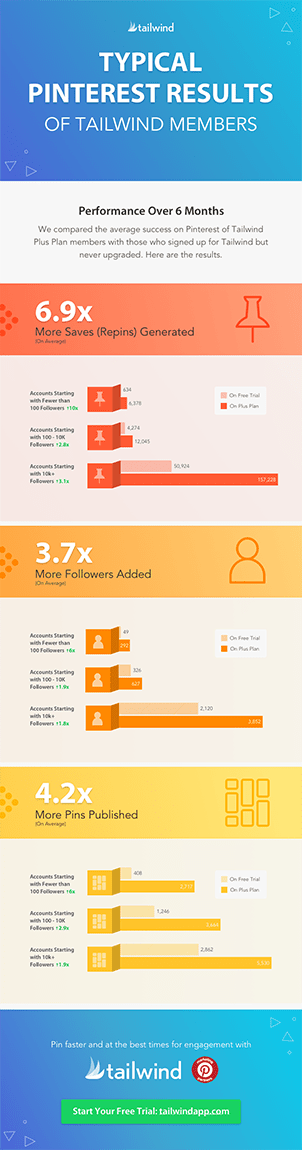
I hope this post has been helpful in showing you all that Tailwind can do to help your website gain more traffic! Once you become familiar with its features, it can become so easy and helpful. I’ve included some information below on some of the results you can see on Pinterest and Instagram from using Tailwind’s features. If you have any other questions that I didn’t cover in this post, feel free to ask below in the comments!





Leave a Reply